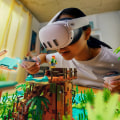
In a world where technology is continuously reshaping the way we learn, virtual reality (VR) stands out as a groundbreaking tool that offers students immersive educational experiences. Imagine stepping into a historical event while sitting in your classroom or exploring the vastness of space without ever leaving your home. The evolution of educational VR apps has unlocked new frontiers in learning, making it more engaging and effective than ever before. The advent of these innovative applications has transformed traditional teaching methods, allowing students to interact with complex subjects in ways that textbooks simply cannot match. From mastering intricate scientific concepts to experiencing cultural heritage first-hand, the possibilities are endless.
As educators and learners alike embrace this technological revolution, it becomes crucial to identify the best educational VR apps for students that can enhance their academic journey. This article aims to guide you through the top educational VR apps available today, highlighting their unique features and benefits. Whether you are a student seeking to enrich your learning experience or an educator looking to integrate VR into your curriculum, our comprehensive list will help you navigate the exciting world of virtual reality education. The transformative potential of virtual reality in education is immense, fundamentally changing how students engage with content. By immersing learners in realistic environments, educational VR apps can make complex topics more understandable and enjoyable. As technology advances, VR is becoming increasingly relevant in classrooms, with both students and educators embracing these tools to enhance the learning experience. Educational VR apps can be categorized into several key areas.
In the realm of science, applications like Google Expeditions allow students to explore the human body or outer space in a 3D environment, making abstract concepts tangible. These apps often include interactive elements that encourage exploration and experimentation, fostering a deeper understanding of scientific principles. Moving on to history, apps such as TimeLooper transport users to pivotal moments in history, allowing them to experience events like the signing of the Declaration of Independence or the construction of ancient monuments. This immersive approach not only captivates students' attention but also instills a sense of connection to the past that traditional textbooks cannot achieve. For those interested in language learning, applications like ImmerseMe provide interactive scenarios where learners can practice conversation skills in realistic settings. By simulating real-life interactions, these apps help users develop fluency and confidence in a new language, making the learning process more effective and enjoyable. In the realm of art, apps like Tilt Brush enable students to create three-dimensional artworks within a virtual space.
This not only fosters creativity but also allows learners to experiment with techniques and styles that may not be possible in traditional art classes. The ability to visualize and manipulate art in a 3D environment can significantly enhance artistic skills and appreciation. The features that make these VR apps effective for learning include interactivity, immersion, and accessibility. By engaging multiple senses, VR experiences can lead to improved retention of information. Additionally, many apps provide built-in assessments or feedback mechanisms that help educators track student progress and adapt lessons accordingly. To get started with VR technology, setting up a VR headset and software is essential for optimal use.
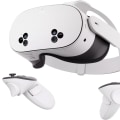
First, ensure that your chosen headset is compatible with your device—whether it’s a PC, gaming console, or standalone unit. Popular headsets like the Oculus Quest 2, HTC Vive, and Valve Index offer various features catering to different budgets and preferences. The Oculus Quest 2, for instance, is known for its affordability and ease of use, making it an excellent option for educational purposes. During setup, users may encounter common challenges such as connectivity issues or insufficient space for movement. It’s crucial to follow the manufacturer’s instructions carefully and ensure that your play area is clear of obstacles.
If you face activation issues, restarting the headset or checking for software updates can often resolve these problems. Additionally, connecting through a stable Wi-Fi network is vital for online applications. If troubleshooting becomes necessary, many manufacturers provide comprehensive online support resources, including FAQs and user forums. Engaging with these communities can also yield tips from other users who have faced similar issues. When selecting a VR headset for educational use, consider factors such as budget, comfort during extended use, and compatibility with various educational apps. The Oculus Quest 2 stands out as an ideal choice due to its wireless capabilities and vast library of educational content.
For those seeking higher-end options, the HTC Vive Pro offers superior graphics and tracking precision but at a higher price point. Ultimately, investing in quality VR technology opens up new frontiers in education. As students interact with immersive experiences, they develop critical thinking skills and a genuine curiosity about the world around them. With an ever-growing selection of educational VR apps, there has never been a better time to embrace this innovative approach to learning.
Troubleshooting Common Activation Issues
While the integration of virtual reality (VR) into education offers a wealth of opportunities, users may encounter various activation issues that can hinder their experience. Here are some common problems and solutions to help students and educators get started smoothly.1.Compatibility Problems:
Ensure that your VR headset is compatible with your device.Check the manufacturer's website for a list of supported devices and operating systems.
2.Software Installation Errors:
Sometimes, users face issues during the installation of VR software. Make sure to download the latest version of the software from official sources and follow the installation instructions carefully.3.Connection Issues:
If your VR system is not connecting to your computer or console, verify that all cables are securely connected. Additionally, check for any firmware updates that may improve connectivity.4.Account Activation Problems:
Users may experience difficulties when activating their accounts for VR platforms. Ensure that you have entered the correct credentials and check your email for any verification messages.5.Hardware Malfunctions:
If your VR headset is not powering on or responding, inspect it for any visible damage and consult the user manual for troubleshooting steps.Sometimes, a simple reset can resolve these issues.
6.Performance Issues:
If your VR experience is lagging or stuttering, close any background applications that may be consuming system resources. Also, consider adjusting the graphics settings within the VR software for optimal performance. By addressing these common activation issues, users can ensure a smoother transition into the immersive world of virtual reality, allowing them to fully benefit from its educational potential.Categories of Educational VR Apps
Virtual reality has revolutionized the way educational content is delivered, providing immersive experiences that enhance understanding and retention. Below, we explore various categories of educational VR apps that cater to different learning needs and subjects.Science Simulations
allow students to explore complex scientific concepts in a virtual environment. From dissecting virtual frogs to simulating chemical reactions, these apps make abstract ideas tangible and engaging.They enable learners to conduct experiments that would be impossible or unsafe in real life, fostering a deeper understanding of scientific principles.
Historical Reconstructions
transport students to pivotal moments in history. By walking through ancient civilizations or witnessing key events, learners can gain a firsthand perspective on historical contexts and cultural practices. This category not only enhances historical knowledge but also promotes empathy and critical thinking as students experience life from different eras.Language Immersion Experiences
utilize VR to create immersive environments for language learners. These apps often simulate real-world interactions in foreign languages, allowing students to practice speaking and comprehension skills in context.This immersion helps break down language barriers and encourages confidence in using new languages.
Geography Exploration
apps enable students to travel the world without leaving the classroom. They can explore geographical features, climates, and ecosystems through interactive 3D models. This category enhances spatial awareness and global understanding, making geography lessons more impactful.Art and Creativity Tools
offer students the opportunity to create and interact with art in virtual spaces. These applications can range from virtual galleries showcasing famous works to tools for creating digital art or music.Engaging with art in this way fosters creativity and allows students to express themselves in innovative ways. Each of these categories showcases the diverse applications of VR in education, highlighting its potential to transform learning experiences across various subjects. Engaging with art in this way fosters creativity and allows students to express themselves in innovative ways. Each of these categories showcases the diverse applications of VR in education, highlighting its potential to transform learning experiences across various subjects.
Setting Up Your VR Headset
Setting up your VR headset is an essential step to embark on an immersive educational journey. Here are step-by-step instructions tailored for various types of VR headsets:1.Oculus Quest 2: First, charge your headset using the provided cable. Once charged, power it on by pressing the power button. Follow the on-screen instructions to connect to Wi-Fi and create or log in to your Oculus account.After that, set up your play area by defining your boundaries. Finally, download the desired educational apps from the Oculus Store.
2.HTC Vive:
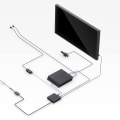
Start by connecting the base stations to power and mounting them in opposite corners of your play area. Connect the headset to your PC via the provided link box. Install the SteamVR software from Steam if you haven't done so already.Once installed, follow the prompts to set up your play area and configure the headset settings.
3.PlayStation VR:
Connect the PS VR headset to your PlayStation console using the included cables. Plug in the processor unit and connect it to your TV. Make sure your PlayStation system is updated to the latest software version. Once everything is connected, put on the headset and navigate to the VR mode in the settings menu to start exploring educational experiences.4.Windows Mixed Reality Headsets:
Begin by connecting your Mixed Reality headset to your PC via USB and HDMI.Install the Windows Mixed Reality software from the Microsoft Store if it's not already installed. After installation, follow the setup wizard to define your play area and calibrate the headset for optimal performance. Regardless of which VR headset you choose, ensure that your device is updated regularly and explore user guides for specific troubleshooting tips. Once set up, dive into a world of engaging educational content!
Top Recommended Educational VR Apps
In the rapidly evolving landscape of education, virtual reality (VR) has emerged as a powerful tool that enhances the learning experience. Here are some of the top recommended educational VR apps that are making waves in classrooms and beyond:Google Expeditions: This app offers immersive field trips to various locations around the world, allowing students to explore places they might never visit in real life.With over 900 expeditions available, learners can dive into the depths of the ocean, walk through historical sites, or even explore outer space. The app promotes an interactive learning experience, making it easier for students to engage with the content.
Engage
: A versatile platform designed for educators, Engage allows teachers to create their own VR lessons and environments. It supports collaboration and interaction among students, making it ideal for group projects and presentations. The app’s customizable features enable educators to tailor lessons that fit their specific curriculum needs.Nearpod VR
: This app combines interactive lessons with VR experiences.Teachers can create engaging slideshows that include 360-degree images and videos, enabling students to explore concepts in depth. Nearpod also offers real-time assessments, allowing educators to gauge student understanding as they navigate through the material.
zSpace
: zSpace is an innovative educational platform that merges VR and augmented reality (AR) to provide a hands-on learning experience. It allows students to interact with 3D models of human anatomy, physics simulations, and more. The immersive nature of zSpace fosters deeper understanding through interactive exploration.CoSpaces Edu
: This app empowers students to create their own VR content by designing their own worlds and scenarios.With CoSpaces Edu, learners can develop coding skills while bringing their creative ideas to life in a virtual environment. This app encourages collaboration and critical thinking as students work together on projects.
Discovery VR
: Offering a wealth of educational content, Discovery VR provides users access to documentaries and explorative experiences across various subjects, from nature and science to history and culture. Students can immerse themselves in these rich narratives, gaining a better understanding of the world around them. These educational VR apps not only make learning more engaging but also cater to different learning styles, ensuring that all students can benefit from this revolutionary technology.Choosing the Right VR Headset
When it comes to integrating virtual reality into education, selecting the appropriate VR headset is crucial for maximizing the learning experience. Various factors, such as price, performance, and educational suitability, should be considered to make an informed decision.Price
is often the first consideration for both schools and students.There are budget-friendly options like the Oculus Quest 2, which offers a standalone experience without the need for a powerful PC, making it an accessible choice for many. On the other hand, high-end headsets like the Valve Index provide superior graphics and tracking capabilities but come with a steeper price tag. It's essential to weigh the cost against the features and benefits that each headset offers. In terms of performance, headsets vary significantly in their capabilities. The resolution, field of view, and refresh rate are vital specifications that impact the user experience.
For educational purposes, having a headset with high resolution (at least 1080p per eye) can enhance immersion and clarity during lessons. Additionally, headsets that support room-scale tracking allow students to move around in a virtual environment, which can be particularly beneficial for interactive learning experiences. Lastly, suitability for educational use is a key aspect to consider. Some headsets come with pre-loaded educational content or have access to platforms specifically designed for learning, such as Engage or AltspaceVR. These platforms offer tools and resources tailored for educators and students, facilitating collaborative and interactive learning opportunities.
Furthermore, consider user comfort and ease of use; headsets that are lightweight and have adjustable straps can make long sessions more manageable for students. In summary, when choosing a VR headset for educational purposes, it's essential to evaluate each option based on price, performance, and educational suitability. By doing so, educators and students can select the best device to enhance their immersive learning experiences. In conclusion, the transformative impact of educational VR apps on student learning cannot be overstated. These innovative tools not only enhance engagement but also foster a deeper understanding of complex subjects through immersive experiences. As students and educators alike continue to discover the benefits of virtual reality, we encourage you to explore these applications and consider integrating them into your studies or teaching practices. Moreover, it is crucial to ensure that your VR setup is optimal and to familiarize yourself with troubleshooting techniques.
By doing so, you can significantly enhance your overall experience and maximize the educational opportunities that these remarkable technologies offer.