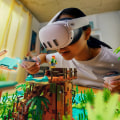
As the world of technology continues to evolve, Virtual Reality (VR) has emerged as one of the most exciting frontiers in entertainment and education. However, immersing yourself in a VR experience is not without its challenges. One of the most critical aspects of enjoying VR safely is ensuring that your physical environment is properly set up. In this article, we will explore the importance of creating a safe play area for VR and provide essential tips to help you design a space that maximizes enjoyment while minimizing risks. Imagine donning your VR headset, fully transported into another world, only to be abruptly jolted back to reality by an unexpected obstacle in your physical space.
Such scenarios can lead to accidents and injuries, detracting from the immersive experience that VR promises. Therefore, understanding how to establish a secure play area is not just a precaution; it's a vital step toward enhancing your overall VR experience. In this guide, we will walk you through various considerations for setting up your VR space—from measuring your room dimensions and identifying potential hazards to organizing your equipment and furniture. Whether you're a seasoned VR user or just starting out, knowing how to create a safe environment will empower you to enjoy your virtual adventures with peace of mind. So, let's dive in and learn how to create the ideal play area for your next VR session!Creating a safe play area for VR is crucial for enhancing your virtual reality experience while minimizing the risk of accidents.
The immersive nature of VR can lead to disorientation, and without proper precautions, you might end up bumping into furniture or tripping over obstacles. Thus, it’s essential to designate a dedicated space for VR use rather than relying on a shared area that may not be adequately prepared for movement. The first step in establishing a safe play area for VR is to measure the available space. Different VR systems have specific requirements regarding the dimensions of the play area. For instance, many popular headsets recommend at least a 6.5 by 6.5-foot space for optimal tracking.
Knowing these dimensions allows you to determine if your area meets these guidelines. Consider not only the square footage but also the height of your space to avoid any accidental collisions with overhead fixtures. Once you have established your measurements, it’s time to clear the area of any obstacles. Furniture, decor, and other items can easily become hazards during an active VR session. Clear away coffee tables, chairs, or anything else that could be in your way.
If you must keep certain pieces of furniture in the area, consider moving them against walls or repositioning them out of your play zone. If possible, use soft furnishings or safety pads on sharp corners to further protect yourself. Lighting also plays a critical role in creating a safe play area for VR. Ensure that your designated space is well-lit but avoid harsh lighting that could create glare on the headset lenses. Natural light is ideal, but if that’s not possible, soft LED lights can help illuminate the area while maintaining a comfortable atmosphere.
Additionally, ensure that light switches are easily accessible so you can adjust lighting as needed before beginning your VR experience. Having a dedicated space for VR is significantly more beneficial than attempting to share an area used for other activities. A dedicated space allows you to keep the area organized and consistently ready for use. This setup helps you establish boundaries and reduces the likelihood of distractions from other household activities. Moreover, it fosters a more immersive experience as you can fully engage with the virtual environment without constant interruptions. As you prepare your safe play area for VR, take steps to protect your furniture and walls from potential damage during use.
Consider placing mats or rugs on the floor to provide cushioning in case of falls and to prevent wear on your flooring. Use wall protection such as corner guards or padded foam panels if your play area is close to walls, especially if you tend to move around vigorously during gameplay. Floor surfaces matter too; carpets can provide comfort but may interfere with tracking accuracy for some headsets. Hard floors are preferable as they offer better tracking and are easier to clean in case of spills or accidents. Assess your flooring type and make adjustments accordingly to ensure both safety and functionality. If you encounter tracking issues while using your VR headset, the first thing to check is whether your space is large enough according to manufacturer specifications.
Insufficient space can lead to poor tracking quality, causing disruptions in your experience. Always ensure that sensors are unobstructed and positioned correctly to capture movement accurately. In addition, be aware of potential interference from electronic devices or reflective surfaces that might disrupt tracking performance. If problems persist despite meeting size requirements, consider moving any nearby electronics away from your play zone or adjusting the placement of your sensors. Popular VR headsets like the Oculus Quest 2, Valve Index, and HTC Vive have varying requirements for play area size and setup. The Oculus Quest 2 recommends at least 6.5 by 6.5 feet of unobstructed space for an optimal experience, while Valve Index suggests a larger area of up to 10 by 10 feet for full room-scale experiences.
Knowing these requirements helps inform how you set up and maintain your safe play area for VR.The types of experiences available in VR range widely from seated gaming experiences to full room-scale explorations that require more movement and physicality. Depending on what you plan to do in VR, you may need to adjust your setup accordingly; for example, experiences that involve physical activity will require a larger space free from obstacles compared to seated experiences. In conclusion, creating a safe play area for VR is essential not only for preventing accidents but also for enhancing immersion and overall enjoyment of virtual reality technology. By following these steps — measuring space, clearing obstacles, ensuring proper lighting, protecting furniture and walls, addressing floor surfaces, troubleshooting common issues — you’ll be well on your way to enjoying a safe and engaging VR experience.
Clearing Obstacles
When setting up your VR space, one of the most critical steps is clearing obstacles that could interfere with your gameplay. Virtual reality immerses you in a digital environment, and to fully enjoy that experience, it is essential to have a designated area free from potential hazards. Start by removing any furniture, such as coffee tables, chairs, and decorative items, that could pose a risk during movement.Even small items like pet toys or cables can lead to trips and falls, disrupting the immersive experience. By ensuring that your play area is clear of these hazards, you not only enhance your safety but also allow for more fluid motion and interaction in the virtual world. Consider marking the boundaries of your play space with tape or mats to visually indicate the safe zone. This can help you stay aware of your surroundings while engrossed in VR, minimizing the likelihood of accidental collisions with real-world objects. Additionally, think about the height of your room. Low-hanging fixtures or ceiling fans can be a concern, especially during vigorous gameplay.
If necessary, adjust the height of objects or even consider relocating your VR setup to a more spacious area. In conclusion, taking the time to clear obstacles from your VR play area is essential for creating a safe environment. This preparation not only enhances your safety but also significantly improves immersion and enjoyment while using VR technology.
Lighting Considerations
Lighting plays a crucial role in VR experiences, influencing both immersion and comfort. Poor lighting conditions can lead to discomfort, eye strain, and even nausea while using virtual reality headsets. To ensure a seamless experience, it’s essential to consider how different lighting setups can impact your VR play area. Firstly, avoid direct overhead lighting, as it can create harsh shadows and glare on the headset lenses.Instead, opt for soft, diffused lighting that minimizes harsh contrasts. This type of lighting helps to create a more inviting atmosphere and reduces the chances of distractions while immersed in the virtual world. Secondly, consider the placement of your light sources. Position lights around the perimeter of your play area rather than directly in front of you or behind you. This arrangement helps to illuminate the space without creating unwanted reflections on your headset.
Additionally, using adjustable lamps or smart bulbs can allow you to modify brightness levels according to your preferences. Lastly, pay attention to the color temperature of your lighting. Warmer tones (around 2700K-3000K) can help create a cozy environment, while cooler tones (around 4000K-5000K) may enhance alertness and focus. Experiment with different settings to find what works best for your individual VR sessions. By addressing these lighting considerations, you can significantly enhance your VR experience, making it not only safer but also more enjoyable.
Flooring and Safety
When setting up your VR play area, one of the most critical factors to consider is the flooring. A suitable floor surface can significantly impact your safety while engaging in virtual reality experiences.The right flooring helps prevent slips, trips, and falls, which are common hazards in immersive environments. Hard surfaces such as tile or hardwood can be unforgiving during unexpected movements or stumbles. Opting for soft flooring, such as carpet or padded mats, can reduce the risk of injury by providing a cushioned landing in case of a fall. This cushioning effect not only enhances safety but also contributes to a more enjoyable VR experience. Additionally, the texture of the flooring plays a vital role in maintaining stability. Smooth surfaces can lead to sliding, while textured options offer better grip.
To further enhance safety, consider using or interlocking foam tiles that provide both comfort and traction. Another important aspect is the size of the play area. Ensure that the flooring extends beyond your expected movement range to accommodate sudden shifts in position. This precaution helps to create a dedicated space that minimizes the risk of colliding with furniture or walls, allowing for greater immersion in the VR environment. In summary, selecting appropriate flooring is essential for creating a safe VR play area. By prioritizing soft, textured surfaces and ensuring ample space, you can protect yourself from potential injuries while fully enjoying your virtual reality adventures.Types of VR Experiences
Virtual reality (VR) offers a diverse range of experiences that can cater to various interests and needs.
Depending on the type of VR experience, the requirements for a safe play area can differ significantly.
Gaming
is one of the most popular applications of VR. In gaming, users engage in interactive environments where they can move around, fight enemies, or explore fantastical worlds. This often necessitates a larger space to allow for physical movement without obstacles that could lead to accidents. On the other hand, educational applications of VR are becoming increasingly prevalent.These experiences may include virtual classrooms, immersive historical tours, or science simulations. While some educational experiences may require less physical space, they still need to be conducted in an area free from distractions and hazards to maintain focus and learning efficiency. Moreover, fitness and exercise VR applications have emerged, encouraging users to engage in physical activity while immersed in a virtual setting. These experiences can be physically demanding and require ample room for movement as well as safe flooring to prevent slips and falls. Finally, there are social VR experiences, where users interact with others in a virtual space. These settings may not require as much physical movement but still demand a well-defined area to avoid collisions with real-world furniture or other players. In summary, understanding the various types of VR experiences is crucial for setting up a safe play area.
Each experience comes with its unique requirements, emphasizing the importance of tailoring the play space accordingly to enhance immersion and enjoyment while using VR technology.
Troubleshooting Common Issues
Setting up your VR space can sometimes lead to activation problems that may hinder your immersive experience. Here are some common issues and their solutions to help you get started without a hitch.1.Tracking Issues:
If your VR headset is not tracking your movements properly, ensure that the sensors are unobstructed and positioned correctly. Check for any reflective surfaces that may interfere with the sensors and adjust your play area accordingly.2.Software Compatibility:
Make sure that your VR headset is compatible with your hardware. Check the system requirements for both the VR headset and the games or applications you intend to use.Updating drivers and software can often resolve compatibility issues.
3.Connectivity Problems:
If your headset is not connecting to your PC or console, verify that all cables are securely plugged in. For wireless headsets, ensure that your Wi-Fi connection is stable and that the headset is within range of the receiver.4.Calibration Errors:
Calibration is crucial for an optimal VR experience. If you experience drifting or misalignment, re-calibrate your VR headset by following the manufacturer’s instructions. This process usually involves moving the headset in a specific pattern to recalibrate its position.5.Audio Issues:
If you're experiencing problems with sound, check the audio settings on both your headset and connected device.Ensure that the audio output is directed to the correct device, and adjust volume levels as needed. By addressing these common issues promptly, you can ensure that your VR experience remains enjoyable and immersive. Remember to consult your manufacturer's troubleshooting guide for more specific solutions tailored to your device.
Measuring Your Space
Before diving into the world of virtual reality, it's essential to understand how to measure your available space accurately. This step ensures that you can create a safe play area for VR that enhances your overall experience. Start by determining the dimensions of the room where you plan to set up your VR equipment. Use a measuring tape to find the length and width of the space.Ideally, you should have at least 6.5 feet by 6.5 feet of clear area, but more room is always better for a fully immersive experience. Next, consider any furniture or obstacles that might be present in the space. Take measurements of these items and account for their placement when planning your VR setup. Remove or rearrange furniture as necessary to ensure ample room for movement without the risk of bumping into things. Additionally, check the height of your ceiling. A standard height is usually sufficient, but if you have overhead fixtures or fans, make sure they are out of the way to prevent any accidents during your VR sessions. Once you have your measurements, sketch a simple layout of the room.
Mark where your VR headset and other equipment will go, along with the boundaries of your play area. This visual representation will help you see how much space you have to work with and identify any potential hazards. By taking the time to measure your space accurately, you can create a dedicated and safe play area for VR, allowing for an immersive experience without the worry of accidents or injuries.
Headset Recommendations
When setting up a safe play area for VR, selecting the right headset is crucial. Different VR headsets have unique features and space requirements that can impact your overall experience. Here are some of the best VR headsets available in the market:Oculus Quest 2: This standalone headset offers a wireless experience, making it ideal for small to medium-sized play areas.With a resolution of 1832 x 1920 per eye and built-in tracking, it provides an immersive experience without the need for external sensors. Ensure you have at least 6.5 x 6.5 feet of clear space to maximize its capabilities.
Valve Index
: Known for its high-fidelity visuals and advanced tracking technology, the Valve Index is perfect for larger dedicated play areas. It features a resolution of 1440 x 1600 per eye and has a refresh rate of up to 144 Hz. To fully enjoy its capabilities, a minimum space of 8 x 8 feet is recommended.HTC Vive Pro 2
: This headset delivers stunning graphics with a resolution of 2448 x 2448 per eye and is designed for professional use or serious gamers.The Vive Pro 2 requires an expansive play area of at least 6.5 x 6.5 feet but benefits greatly from larger spaces. It also utilizes external base stations for precise tracking, which should be positioned safely away from your play area.
PlayStation VR2
: For PlayStation console users, the PS VR2 offers an excellent entry point into VR gaming. With a resolution of 2000 x 2040 per eye and integrated haptic feedback, it enhances immersion significantly. A play area of about 6.5 x 6.5 feet is sufficient to enjoy most titles safely. Selecting the right headset not only enhances your VR experience but also plays a critical role in ensuring safety within your designated play area.Always consider the specific requirements of each headset to create a suitable environment that maximizes enjoyment while minimizing risks. In conclusion, establishing a dedicated and safe play area for VR is crucial for maximizing your virtual reality experience. We discussed the importance of measuring your space to ensure adequate room for movement, as well as the necessity of clearing obstacles that could lead to accidents. Proper lighting considerations were highlighted to enhance visibility and immersion, alongside attention to flooring and safety to prevent slips and trips. We also touched upon headset recommendations tailored to different types of VR experiences, ensuring that users can enjoy their time without discomfort or danger. Lastly, troubleshooting common issues can further improve your setup and overall enjoyment.
Remember, safety is paramount; it not only protects you but also significantly enhances your immersion and enjoyment in virtual worlds. We encourage you to take these guidelines seriously and experiment with different setups to discover what works best for your unique environment.