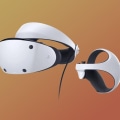
In the rapidly evolving world of gaming, where every millisecond counts, the quest for the ultimate gaming setup has never been more crucial. One of the most significant factors influencing your gaming performance is the connection you choose to rely on. While wireless connections offer convenience, setting up wired connections for lag-free gaming can unlock unparalleled speed and reliability that many avid gamers crave. Imagine diving into an immersive virtual reality experience without the nagging fear of latency or dropped signals.
The thrill of seamless gameplay is within reach, but only if you understand how to optimize your wired connections effectively. This article will explore the essentials of establishing a robust wired setup, ensuring that your gaming sessions are not just enjoyable but also free from distractions that can hinder your performance. Whether you are a casual player or a competitive gamer, the benefits of a well-configured wired network can be a game-changer. From minimizing lag to maximizing bandwidth, every detail matters when you are in the heat of battle. As we delve into the intricacies of optimizing wired connections for seamless gaming experiences, prepare to elevate your gaming adventures to new heights. In the realm of modern gaming, particularly in the context of virtual reality (VR), establishing a reliable wired connection is paramount.
The performance of VR systems hinges on low latency and high bandwidth, both of which are significantly enhanced by using wired connections. While wireless setups offer flexibility, they often fall short in terms of stability and speed, making a wired connection the preferred choice for avid gamers seeking an immersive experience. When discussing the technical aspects of wired connections, it is essential to understand the various types of cables utilized in VR setups. The most common cables include Ethernet, USB, and HDMI. Each plays a critical role in delivering data between the gaming device and the VR headset.
Ethernet cables are crucial for internet connectivity, ensuring that your gaming device can access online features with minimal lag. For connecting peripherals and headsets, USB cables provide the necessary data transfer speeds, while HDMI cables are responsible for transmitting high-definition video and audio signals from your gaming system to the VR headset. Choosing the right cable lengths and quality is vital to ensure minimal interference in your wired connection. It is generally recommended to keep cable lengths as short as possible to reduce signal degradation. For Ethernet cables, look for those rated CAT 6 or higher to support faster speeds and bandwidth.
For USB, opt for USB 3.0 or higher to ensure quick data transfer rates, while HDMI cables should be certified for high-speed data transmission to support 4K resolution if your VR headset requires it. Setting up a wired connection for your gaming device and VR headset involves several straightforward steps. First, ensure that your gaming device is powered off. Connect the Ethernet cable from your router to the gaming device's LAN port. Next, plug in the appropriate USB cable from the gaming device to the VR headset; this will typically be a USB-C or USB-A connection depending on your hardware.
Finally, connect the HDMI cable from the gaming device's HDMI output to the VR headset’s input. Once all cables are securely connected, power on your gaming device and follow any on-screen instructions to finalize the setup. Despite the advantages, users may encounter connectivity issues that can disrupt their gaming experience. Common troubleshooting tips include checking cable integrity for any visible damage or wear. Ensure that all ports are clean and free from debris; sometimes, simply reseating the cables can resolve connectivity problems.
Additionally, keep your drivers updated, as outdated drivers can lead to performance issues or incompatibilities with newer games or VR applications. For those seeking recommendations on VR headsets that perform optimally with wired connections, several models stand out. The Oculus Rift S offers excellent compatibility with PCs and provides a seamless experience when connected via USB and HDMI. Another strong contender is the Valve Index, which boasts superior refresh rates and responsiveness when used with a wired setup. Both headsets feature specifications that enhance gaming experiences, such as high-resolution displays and wide field-of-view capabilities. While some may voice concerns about mobility restrictions inherent in wired setups, it is essential to weigh these against the stability benefits they offer.
A wired connection eliminates concerns about signal dropouts or latency spikes that often accompany wireless connections. Ultimately, a well-set up wired connection provides gamers with consistent performance, allowing them to fully immerse themselves in their virtual worlds without distraction.
Understanding Wired Connections
When it comes to setting up wired connections for lag-free gaming, it's essential to understand the different types of cables used in VR setups. A reliable wired connection can significantly enhance your gaming experience by reducing latency and ensuring a stable signal. One of the most common types of cables used in VR setups is the HDMI cable. This cable is responsible for transmitting high-definition video and audio signals from your gaming console or PC to your VR headset.For optimal performance, it's recommended to use high-speed HDMI cables that support the latest standards, such as HDMI 2.0 or higher, to ensure that you get the best possible resolution and refresh rates. Another important cable is the USB cable, which is often used to connect the VR headset to your computer. USB 3.0 or higher cables are preferred as they provide faster data transfer rates, reducing latency and improving responsiveness during gameplay. It's important to ensure that your computer has sufficient USB ports available and that they are not overloaded with other devices. In addition to HDMI and USB cables, Ethernet cables play a crucial role in maintaining a stable internet connection. Using a wired Ethernet connection instead of relying on Wi-Fi can significantly reduce ping times and provide a more consistent online gaming experience.
Opt for at least a CAT 5e Ethernet cable or higher for optimal performance. When setting up your wired connections, it’s important to consider cable management as well. Keep cables organized and avoid tangling, which can lead to wear and tear over time. Additionally, ensure that your cables are long enough to reach from your gaming setup to your router or console without being stretched too tightly. By understanding the different types of cables and their functions in your VR setup, you can optimize your wired connections for a truly immersive gaming experience.
Recommended VR Headsets for Wired Gaming
When it comes to wired connections for lag-free gaming, choosing the right VR headset is crucial for maximizing performance. Several headsets stand out in the market, offering robust wired connectivity options that enhance the overall gaming experience.Oculus Rift S
is a popular choice among gamers seeking a reliable wired connection.With its high-resolution display and precise tracking capabilities, it provides an immersive experience that minimizes latency. The Rift S connects directly to your PC via DisplayPort and USB, ensuring a stable and responsive gaming environment. Another excellent option is the Valve Index. Known for its high-quality visuals and superior refresh rates, the Valve Index uses a wired connection to eliminate lag, making it ideal for fast-paced gaming. Its unique finger-tracking controllers add an extra layer of immersion, allowing players to interact with the virtual world more naturally. The HTC Vive Pro 2 also deserves mention as a top-tier headset for wired gaming.
With a stunning 5K resolution and a wide field of view, it delivers breathtaking visuals that pull players into their games. The Vive Pro 2 utilizes a wired connection through a dedicated link box, providing both power and data transfer to ensure uninterrupted gameplay. Lastly, the Pimax 8K X offers an unparalleled field of view and high resolution, making it a favorite among enthusiasts. Its dual 4K displays require a powerful PC setup, but once connected via a wired setup, it can deliver an extraordinarily immersive VR experience without the drawbacks of wireless latency. In summary, selecting any of these top VR headsets will significantly enhance your wired connections for lag-free gaming. Investing in a quality wired setup not only reduces latency but also elevates your overall VR gaming experience, providing the immersion that today’s gamers seek.
Troubleshooting Common Issues
Even with a reliable wired connection, gamers can encounter various connectivity issues that may disrupt their gaming experience.Understanding these common problems and how to resolve them can help ensure a smooth and enjoyable gaming session.
1.Cable Damage
: One of the most frequent issues is damage to the Ethernet cable. Check for any visible signs of wear, fraying, or kinks in the cable. If you find any damage, replacing the cable with a new, high-quality Ethernet cable can resolve connectivity problems.2.Loose Connections
: Loose connections can lead to intermittent disconnections or unstable connections. Make sure both ends of the Ethernet cable are firmly connected to the router and the gaming device.If necessary, unplug and replug the connections to ensure they are secure.
3.Router Configuration
: Sometimes, the router settings may need adjustment. Access your router's settings through its IP address and check for any configurations that might be affecting performance, such as Quality of Service (QoS) settings that prioritize gaming traffic.4.Overloaded Network
: If multiple devices are using the same network, it can lead to bandwidth congestion. To alleviate this, disconnect devices that are not in use or consider upgrading your internet plan for higher bandwidth.5.Network Interface Card (NIC) Issues
: The network interface card on your gaming device may have issues or outdated drivers. Ensure that your NIC drivers are up to date and consider troubleshooting the NIC if connectivity problems persist.6.Firewall or Antivirus Interference
: Sometimes, firewall or antivirus software can block game traffic, leading to connectivity issues.Temporarily disable these programs to see if they are causing the problem and adjust their settings accordingly. By identifying and addressing these common issues, gamers can maintain a reliable wired connection that enhances their overall gaming experience.
Setting Up Your Wired Connection
Establishing a reliable wired connection for your VR gaming setup is crucial for achieving the best performance. Follow these steps to connect your VR headset to your gaming device using wired connections.Step 1: Gather Your Equipment
- Before you begin, ensure you have all necessary equipment on hand. This includes your VR headset, a compatible gaming device (such as a PC or console), and the appropriate cables (USB and HDMI or DisplayPort depending on your headset).Step 2: Locate the Ports
- Identify the ports on your VR headset and gaming device. Most VR headsets will have designated ports for video and data transmission.Refer to the user manuals for both devices if you are unsure about the connections.
Step 3: Connect the Cables
- Carefully connect the HDMI or DisplayPort cable from your gaming device’s graphics card to the corresponding port on your VR headset. Next, connect the USB cable from the headset to a USB port on your gaming device. Make sure each connection is secure to avoid any disruptions during gameplay.Step 4: Install Necessary Drivers
- After physically connecting your devices, you may need to install drivers or software specific to your VR headset. Visit the manufacturer’s website to download the latest drivers and follow their installation instructions.Step 5: Configure Display Settings
- Once everything is connected and installed, configure your display settings.Access your gaming device’s display settings and select the VR headset as the primary display if necessary. Adjust resolution settings for optimal performance based on your headset's capabilities.
Step 6: Test Your Connection
- Before diving into a gaming session, test your setup to ensure everything is functioning correctly. Launch a VR application or game and check for any latency or connectivity issues. If you experience problems, double-check all connections and settings. By following these steps, you can successfully set up a wired connection that enhances your VR gaming experience with reduced latency and improved performance.Comparing Wired and Wireless Setups
Wired connections and wired setups are often regarded as the gold standard for gaming, especially in the context of VR gaming.This section will delve into the advantages and disadvantages of both wired and wireless options, allowing gamers to make informed decisions based on their individual needs.
Pros of Wired Connections:
One of the primary benefits of a wired connection is the reduced latency. With a direct line from the router to the gaming device, data packets travel faster, leading to minimal delay. This is particularly crucial in VR gaming, where even slight delays can break immersion and disrupt gameplay. Additionally, wired connections are less susceptible to interference from other wireless devices, ensuring a more stable connection.Moreover, a wired setup typically offers higher bandwidth, which can enhance download speeds and support multiple devices without compromising performance.
Cons of Wired Connections:
However, wired connections do have their downsides. The need for physical cables can limit mobility and create clutter in gaming spaces. Setting up a wired connection may also require additional equipment, such as longer cables or switches, depending on the layout of your gaming area. For some users, this added complexity might be off-putting.Pros of Wireless Connections:
On the other hand, wireless setups provide unmatched convenience.Without cables, gamers can easily move around their play area, which is especially beneficial for immersive VR experiences. Additionally, modern wireless technology has improved significantly, with many devices offering high-speed connections that can handle gaming demands effectively.
Cons of Wireless Connections:
Despite these advantages, wireless connections often come with increased latency due to signal transmission and potential interference from other devices. This can be detrimental in fast-paced gaming scenarios where every millisecond counts. Furthermore, wireless networks can experience drops in connection quality based on distance from the router or physical obstructions within the environment. Ultimately, while both setups have their merits, wired connections are generally favored for serious gamers seeking the best performance and reliability.Understanding these differences helps gamers choose the right option based on their priorities and play style. In conclusion, establishing a reliable wired connection is essential for lag-free gaming, especially in the realm of VR gaming. Throughout this article, we have highlighted the myriad advantages that a wired setup offers, such as reduced latency, improved stability, and an overall enhanced user experience. By understanding the intricacies of wired connections and effectively setting them up, gamers can significantly elevate their immersive experiences. As the popularity of VR continues to surge, it becomes increasingly important for gamers to carefully evaluate their setup options. Whether you prioritize high-performance gaming or seek to enjoy a seamless VR experience, choosing a wired connection can be a game-changer.
We encourage readers to consider their gaming needs and preferences, ensuring that they make informed decisions that align with their ultimate gaming goals.